Details

Category
Items · Electronics
Location
Port Vila, Efate
Bellevue
Condition
New
Posted
16 Nov 2026

Description

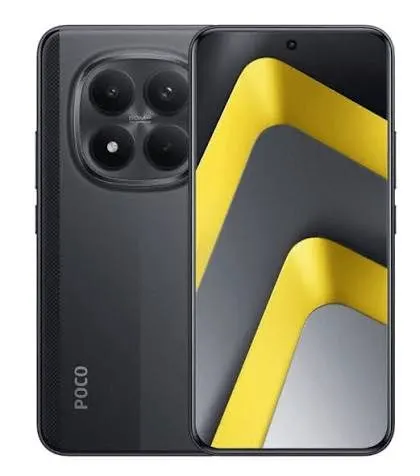
Smooth performance, fast connectivity, and plenty of storage with the Xiaomi POCO M8 5G smartphone.

Key Features:

12GB RAM – Smooth multitasking and everyday performance

512GB Storage – Plenty of space for photos, videos, apps, and files

5G Connectivity – Fast mobile internet on supported networks

Dual SIM – Convenient for managing two phone numbers (subject to model variant)

Sleek Black Design – Modern and stylish appearance

Ideal for everyday use, social media, entertainment, gaming, and work.

Brand: Xiaomi POCO
Model: M8 5G
Colour: Black
RAM: 12GB
Storage: 512GB

3 views 16 Nov Report this listing

New

Xiaomi POCO M8 512GB 12GB 5G Black

VT 35,600

Port Vila, Efate · Bellevue

Share this listing

Facebook
Island Market Electronics On Island Market since November 2026 5 listings · Business

No reviews yet

Visit the store

Stay safe

  • Meet in a safe public place, and inspect the item before you pay.
  • Be careful with deposits and advance payments.
  • For vehicles and property, check ownership papers and details first.
More safety tips

Similar listings

Contact Support

How would you like to reach us?

Install the app

Free, no app store needed, and it takes almost no space on your phone.

Inside Facebook, Instagram or Messenger

  1. Tap the menu (•••) at the top of the screen.
  2. Choose “Open in browser” (Chrome or Safari).
  3. In the browser, open “Install the app” again from the bottom of the page.

iPhone and iPad (Safari)

  1. Tap the Share button: the square with an arrow pointing up, at the bottom of the screen (top right on iPad). If you don't see it, tap ••• first.
  2. Scroll down and tap “Add to Home Screen”. If it isn't in the list, tap “View More” or “Edit Actions”.
  3. Tap “Add” at the top right. Island Market now has its own icon on your home screen.

iPhone and iPad (Chrome and other browsers)

  1. Tap the Share button (the square with an arrow pointing up) in the address bar, at the top right.
  2. Tap “Add to Home Screen”, then “Add”.
  3. Not in the list? Open islandmarket.vu in Safari and follow the Safari steps.

Android (Chrome)

  1. Tap the menu (⋮) at the top right of the screen.
  2. Tap “Install app” or “Add to Home screen”.
  3. Tap “Install”. Island Market now has its own icon on your home screen.

Samsung Internet

  1. Tap the menu (☰) at the bottom right of the screen.
  2. Tap “Add page to”, then “Home screen”.
  3. Tap “Add”.

Android (Firefox)

  1. Tap the menu (⋮).
  2. Tap “Install” or “Add to Home screen”, then “Add”.

On a computer

  1. The app is made for phones: open islandmarket.vu on your phone and tap “Install the app” at the bottom of the page.
  2. In Chrome or Edge you can also install it on this computer with the install icon at the right of the address bar.